Instagram Feed 排序器:依瀏覽量排序 Reels 與貼文
Sort Feed for Instagram 把可見的 Instagram 網格變成桌面 Chrome 中可排序的研究檢視。
用本產品頁評估 Instagram 專屬的頁面、指標與限制——不是長篇操作教學。
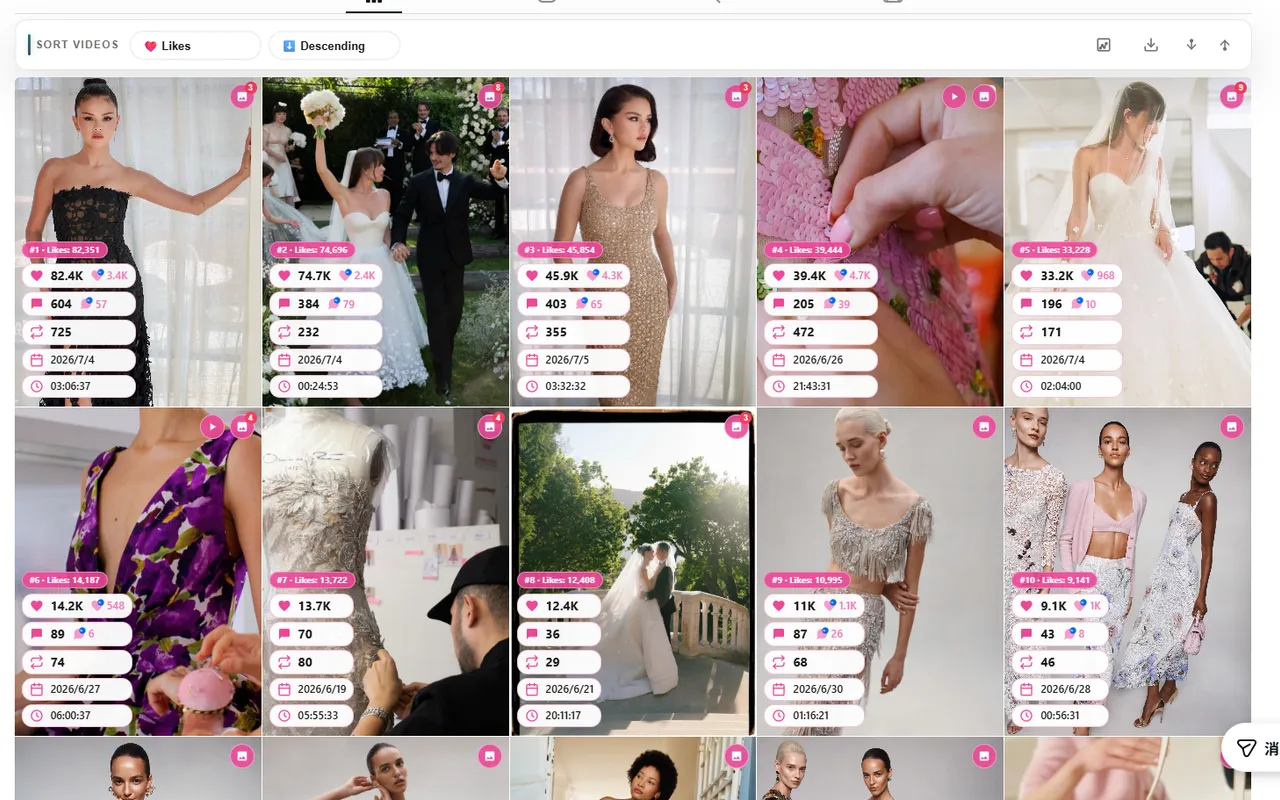
依觀看次數排序
用觀看次數找出觸及領先內容,以及帶來更多曝光的 Reels。
依讚數或留言排序
讚數看即時反應訊號,留言找討論更密集的貼文。
依日期排序
當你關心發文節奏、近期測試或活動時機時,用日期。
排名後再複核
排序後複核更少列,而不是手動掃完整張網格。
直接回答
Instagram Feed 排序器會依所選指標重新排列可見的 Instagram 貼文或 Reels。Sort Feed 在桌面 Chrome 的受支援頁面完成這件事,使用的是目前瀏覽器分頁已載入的內容。
IG app 推薦邏輯 vs Sort Feed 明確排序
IG app 強調內容消費;Sort Feed 專為數據分析設計。
IG app 推薦怎麼排?
- 演算法不透明,不見得符合你的排序需求。
- 推薦邏輯可能隨時變,缺乏統一分析依據。
- 主要為內容消費設計,非結構化比對用。
Sort Feed 帶來什麼?
- 明確依各指標(如觀看、按讚)排序貼文與 reels。
- 「本頁最強貼文」變成可重複驗證的問題。
- 排序後可立即複核所選列,報告從排名開始。
典型 Instagram 排序流程
- 1典型 Instagram 排序流程
從官方上架頁安裝 Sort Feed
使用 sortfeed.io 的安裝連結,並在桌面 Chrome 中釘選擴充功能。
- 2典型 Instagram 排序流程
開啟支援的 Instagram 頁面
使用瀏覽器已能載入的可見個人檔案、Reels 網格、已儲存頁、搜尋頁或探索頁。
- 3典型 Instagram 排序流程
選擇指標
依你要回答的問題選擇觀看次數、讚數、留言或日期。
- 4典型 Instagram 排序流程
複核排名後的貼文
在 Instagram 於頁面暴露這些欄位時,檢查含網址、內文、日期與可見互動指標的所選列。
依觀看次數排序 Instagram 貼文
當研究問題關乎觸及時,依觀看次數排序很有用。它協助你把傳播更遠的貼文與 Reels 浮到前面,而不是依賴 Instagram 預設先顯示的順序。
依觀看次數排完後,檢查前列的鉤子、形式、發布日期與內文模式,挑出可寫入報告或創意 brief 的重點。
- 適合觸及稽核與 Reels 研究。
- 適合比較競品或創作者個人頁。
- 取決於 Instagram 在可見頁面上暴露的觀看次數。
依讚數、留言或日期排序 Instagram 貼文
讚數與留言協助你把廣泛觸及與可見互動分開。日期排序則恢復時間視角,方便理解近期發布或活動節奏。
這些指標一次只盯一個問題更有效。例如先依留言找引發討論的貼文,再切到日期確認峰值是否最近發生。
- 讚數回答即時反應問題。
- 留言回答討論與社群問題。
- 日期回答新近度與節奏問題。
將 Instagram 貼文匯出為 CSV
排序後,Sort Feed 可將所選 Instagram 貼文列匯出為 CSV,用於稽核、客戶報告或試算表複核。典型欄位包括貼文網址、內文、日期,以及頁面上可見的互動指標(觀看次數、讚數、留言等)。
CSV 匯出涵蓋你在支援頁面上選取的可見列——不是完整的私密帳號全量匯出。可用欄與列數上限取決於目前 Chrome 分頁暴露的內容。範例列可能包含貼文網址、短內文片段、發布日期,以及該網格顯示的觀看次數與讚數。
- 依觀看次數、讚數、留言或日期排序後,匯出排名後的貼文列。
- 欄位反映可見指標:網址、內文、日期、觀看次數、讚數、留言,以及可用時的分享或收藏。
- 用 CSV 做研究交接;留言清單或粉絲清單請改用 Instagram 留言/粉絲匯出頁。
限制與負責任使用
Sort Feed 只處理你在支援的 Instagram 頁面上、對目前瀏覽器工作階段可見的內容與欄位。若 Instagram 改版、隱藏某項指標或限制網格顯示,可用排序欄位可能隨之變化。
高影響報告時,請在來源貼文或第一方分析工具中核實最終數字,再做客戶、預算或發布決策。
- 不支援手機 App。
- 無法繞過私密內容。
- 不保證每個 Instagram 頁面都暴露每一項指標。
來自 Chrome 線上應用程式商店的真實評價
以下內容來自 Sort Feed 在 Chrome 線上應用程式商店的近期公開評價,依可確認的評價者名稱、評分、日期與原始評價內容展示。
4.8/5
Chrome 線上應用程式商店公開評分
46
商店頁面可見的評分數量
6,000+
商店頁面公開顯示的使用者數量
"Works great"
"worked liked it"
"Works really well."
"thanks for your Service, Nice work ! i'm in korea, wish you all the best with your business !"
"Simple, straightforward, and effective chronological sorting makes social media browsing more controlled and efficient!"
"This extension is extremely valuable if you want to improve browsing efficiency, especially for content research."
"Fast loading and no lag, works smoothly on both TikTok and Instagram with great compatibility."
"A must have tool to fight algorithm-driven feeds! If you hate "recommended for you" content, you should definitely try this."
"Great Instagram feed sorting tool. Being able to browse posts by publish time makes a huge difference."
"Works instantly after installation. My TikTok feed is now clean and organized without distracting recommendations."
"Perfect for social media managers. It helps me track the latest posts efficiently without missing anything important."
"I've been looking for a way to restore chronological feeds, and this extension does exactly that. Simple, clean, and easy to use."
"This extension is super useful! Finally I can sort TikTok and Instagram feeds chronologically instead of dealing with random algorithms. Huge productivity boost."
"Great idea! Super helpful! This plugin helps me do some simple data analysis, filter out irrelevant content, and keep my feed clean without changing the original experience. It saves me a lot of time on repetitive tasks and makes browsing much more efficient. thx"